Introduction
Wondering how to top up WOWPASS in Korea?
This guide explains how to top up WOWPASS step by step. You will learn where to find a WOWPASS kiosk, how to add money to your card, and what to check before you start.
Follow this guide to top up WOWPASS safely and keep your card ready for travel around Korea.
Table of Contents
Can You Top Up WOWPASS?
Yes, you can top up your WOWPASS card at a WOWPASS kiosk.
If you want to know how to top up WOWPASS, first find a nearby kiosk. Then insert your card and follow the instructions on the screen.
Learning how to top up WOWPASS is simple, but kiosk locations and operating conditions may change. Check the latest kiosk location before you travel, and use the official WOWPASS app for current information.
What You Need Before You Top Up
Before learning how to top up WOWPASS, prepare a few simple items. Having everything ready will make the process faster at the kiosk.
To follow the steps for how to top up WOWPASS, you need:
- Your WOWPASS card
- Cash in a supported currency
- A nearby WOWPASS kiosk
You can also use the WOWPASS app to find a kiosk and check current information before you start.
How to Top Up WOWPASS
This section shows how to top up WOWPASS step by step. Follow these simple instructions to top up WOWPASS safely at an official WOWPASS kiosk.
Step 1. Find a WOWPASS Kiosk
Find a nearby WOWPASS kiosk before you begin. You can use the WOWPASS app to check the latest kiosk locations.
Step 2. Insert Your WOWPASS Card
Insert your WOWPASS card into the kiosk and wait for the menu to appear.
Step 3. Select Top Up
Tap Top Up on the screen to begin adding money to your card.
Step 4. Insert Your Cash
Insert cash in a supported currency. Follow the instructions shown on the kiosk screen.
Step 5. Confirm the Amount
Check the top-up amount carefully. If everything looks correct, confirm your transaction.
Step 6. Wait for the Update
Please wait a few seconds while the kiosk updates your WOWPASS balance. Do not remove your card until the process is complete.
Step 7. Take Your Card
When the transaction is finished, take your WOWPASS card and any receipt if available. Your card is now ready to use for your trip in Korea.
How to Top Up WOWPASS
Use the visual steps below to find a kiosk, insert your card, add cash, confirm the amount, and take your card when it is ready.
Follow the 7 Steps ↓
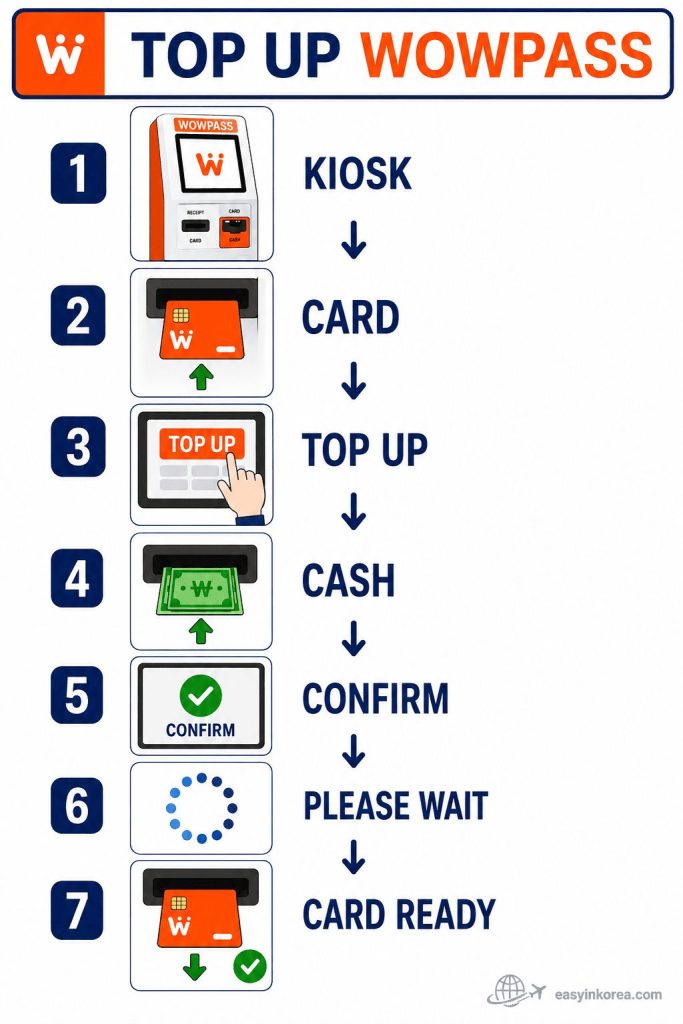
This image shows how to top up WOWPASS from start to finish.
First, find a WOWPASS kiosk and insert your card. Select Top Up, insert cash in a supported currency, and check the amount shown on the screen. Confirm the transaction and wait until the balance update is complete.
When the screen shows that the process is finished, take your card. Do not leave the kiosk while your card is still inside the machine.
Knowing how to top up WOWPASS before you travel can make the kiosk process easier. Kiosk availability, supported currencies, and operating conditions may change, so check the official WOWPASS app for current information.
Which Currencies Can You Use?
Before you learn how to top up WOWPASS, check whether your currency is supported at the kiosk.
Supported currencies for how to top up WOWPASS may change depending on the kiosk and service updates. Check the official WOWPASS app or website before you travel to see the latest supported currencies and information.
Where Can You Top Up WOWPASS?
If you are looking for how to top up WOWPASS, you can use official WOWPASS kiosks in many locations across Korea.
You can top up WOWPASS at airport kiosks, city kiosks, and major tourist areas. The nearest kiosk may vary depending on your location, so use the official WOWPASS app to find the latest kiosk before you travel.
How to Top Up WOWPASS: Start with These 3 Steps
Find the kiosk, insert your card, and select Top Up. Use the visual mission flow below before following the full step-by-step guide.
See What to Do First ↓
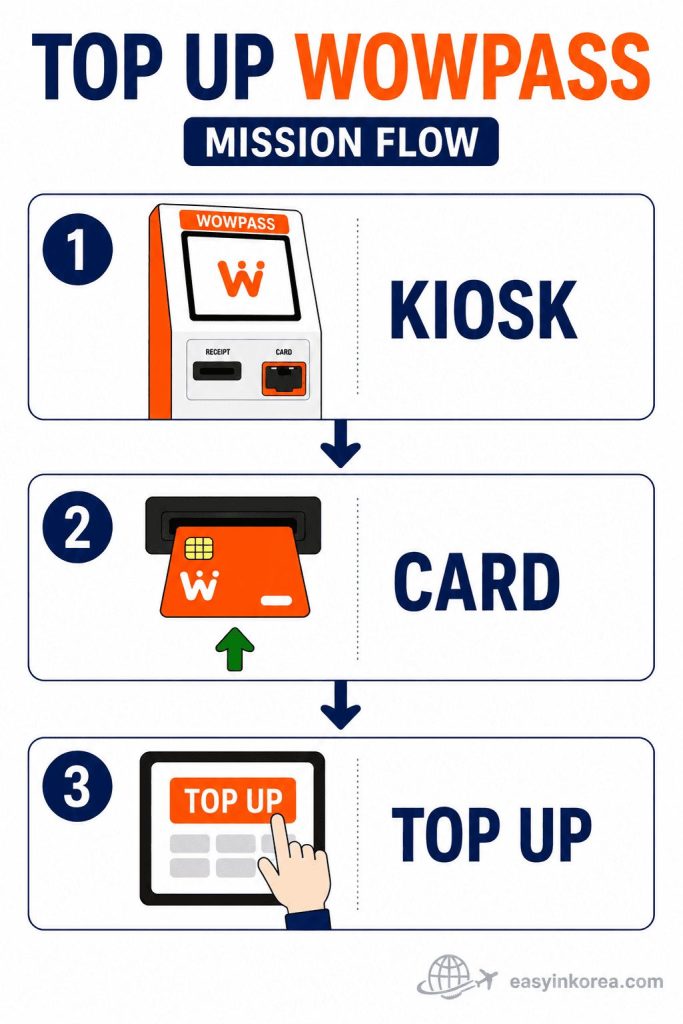
This mission flow shows the first three actions for how to top up WOWPASS.
First, find an official WOWPASS kiosk. Insert your WOWPASS card into the correct card slot. Then select Top Up on the kiosk screen.
These three actions help you start the process quickly. The kiosk will then guide you through adding cash, checking the amount, confirming the transaction, and waiting for the balance update.
Continue to the full step-by-step guide below to see how to top up WOWPASS from start to finish. Kiosk locations and operating conditions may change, so use the official WOWPASS app to find the nearest available kiosk.
How to Check Your WOWPASS Balance
After you learn how to top up WOWPASS, it is easy to check your remaining balance.
You can check your WOWPASS balance in two ways.
- WOWPASS app
Check your payment balance anytime using the official WOWPASS app.
- WOWPASS kiosk
Insert your card into a WOWPASS kiosk to check your balance on the screen.
Checking your balance after how to top up WOWPASS helps you confirm that your funds have been added successfully.
Common Top-Up Problems
If you have a problem while learning how to top up WOWPASS, try the solutions below.
The kiosk does not read my card.
Try inserting your card again.
If it still does not work, use another WOWPASS kiosk.
If the problem continues, contact WOWPASS customer support.
My balance did not change.
Wait a moment after completing how to top up WOWPASS.
Check your balance again using the WOWPASS app or a WOWPASS kiosk.
If your balance is still incorrect, ask the kiosk staff for assistance.
The kiosk is unavailable.
Open the official WOWPASS app.
Find another nearby WOWPASS kiosk and try again.
How to Top Up WOWPASS When Something Does Not Work
Use the recovery flow below if the kiosk does not read your card, your balance does not update, or the kiosk is unavailable.
Find the Next Action ↓
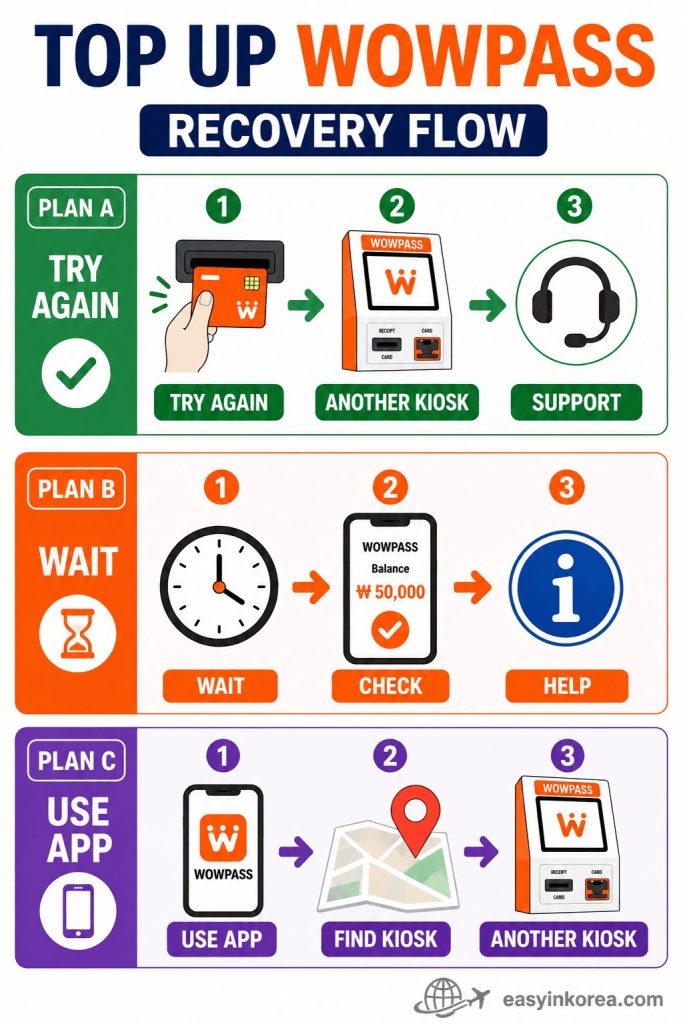
This recovery flow explains what to do if you have a problem while following the steps for how to top up WOWPASS.
If the kiosk does not read your card, try inserting it again. Make sure you are using the correct card slot. If it still does not work, try another WOWPASS kiosk. Contact official WOWPASS support if the problem continues.
If your balance does not change, wait a moment and check it again in the official WOWPASS app or at a kiosk. Ask for help if the balance is still incorrect.
If the kiosk is unavailable, open the official WOWPASS app and find another nearby kiosk. Kiosk locations and operating conditions may change, so check the latest information before you travel.
Continue with the guide below for more help with how to top up WOWPASS safely and confirm that your balance has been updated.
Before You Continue
Do you have your WOWPASS card?
You need your physical WOWPASS card before you follow the steps for How to Top Up WOWPASS at a kiosk.
Do you have supported cash?
Check the kiosk screen before you begin. Supported currencies and kiosk conditions may change.
Do you know where the nearest kiosk is?
Use the official WOWPASS app to find a nearby kiosk and check the latest location information.
What should you check after the top-up?
After completing How to Top Up WOWPASS, check your balance in the official app or on the kiosk screen before leaving.
Easy in Korea — Travelers Wish They Knew…
Should you top up before a long trip?
Yes. After learning How to Top Up WOWPASS, add enough payment balance before a long travel day so you do not need to search for a kiosk during your trip.
Should you keep a small emergency balance?
A small backup balance can be useful for an unexpected purchase. Keep another payment method with you in case your card or a kiosk is unavailable.
Can airport kiosks be busy?
Yes. Airport kiosks may be busy during popular arrival times. Use the official WOWPASS app to check other kiosk locations when needed.
Should you check your balance before entering the subway?
Check the correct balance before you travel. The WOWPASS payment balance and the card’s transport balance may be managed separately, so confirm the balance you need before entering the subway.
What is the easiest habit after a top-up?
After completing How to Top Up WOWPASS, check the updated payment balance in the official app or on the kiosk screen before leaving.
Frequently Asked Questions
Can I top up WOWPASS at the airport?
You may be able to use a WOWPASS kiosk at the airport. Kiosk locations and availability can change, so check the official WOWPASS app before arrival.
Can I use foreign cash?
Some kiosks may accept supported foreign banknotes. Check the kiosk screen or official WOWPASS information for the latest supported currencies before you begin.
Is there a minimum top-up amount?
Minimum and maximum amounts may depend on the kiosk and current service conditions. Check the amount shown on the screen before confirming.
Can I top up my WOWPASS several times?
You can normally add more payment balance when needed, subject to the card balance limit and current service rules. Check your balance before adding more money.
Can someone top up my card for me?
Another person may help you use the kiosk, but keep your card, cash, and balance information secure. Check the final amount yourself before leaving.
What happens if the kiosk is offline?
Do not keep repeating the same transaction. Use the official WOWPASS app to find another nearby kiosk, or contact official support if the problem continues.
How do I know the top-up was completed?
After following the steps for How to Top Up WOWPASS, wait for the completion message. Then check your updated payment balance in the official app or on the kiosk screen.
Is the WOWPASS payment balance the same as the transport balance?
The payment balance and transport balance may be managed separately. When learning How to Top Up WOWPASS, make sure you are adding money to the balance you need.
AI Travel Assistant
What is the easiest way to top up WOWPASS?
The easiest way is to use an official WOWPASS kiosk. Insert your card, choose the top-up option, add supported cash, confirm the amount, and wait for the completion message.
How to Top Up WOWPASS if the kiosk does not read my card?
Remove the card and insert it again in the correct direction. If the kiosk still does not read it, use another kiosk or contact official WOWPASS support.
What should I do if my balance does not update?
Wait a moment and check the payment balance again in the official WOWPASS app or on the kiosk screen. Do not repeat the payment immediately if the first transaction may still be processing.
Can I use the WOWPASS balance for the subway?
The WOWPASS payment balance and transport balance may be managed separately. Check the correct balance before entering the subway or bus.
Where can I find another WOWPASS kiosk?
Open the official WOWPASS app and check the kiosk map. Confirm the latest location and operating status before going there.
What should I check before leaving the kiosk?
After completing How to Top Up WOWPASS, confirm the final amount, check the updated payment balance, and make sure you have taken your card.
What is the safest backup plan?
Keep another payment method and a small amount of Korean won. This can help if your WOWPASS card, the app, or a kiosk is temporarily unavailable.
Official Information
Where can I check official WOWPASS information?
Use the official WOWPASS website and app to check current kiosk locations, supported services, card information, and operating notices.
Why should I check the official source before a top-up?
Kiosk availability, supported currencies, limits, fees, and service conditions may change. Check the latest official information before following the steps for How to Top Up WOWPASS.
Where can I find another WOWPASS kiosk?
Check the official WOWPASS app for nearby kiosk information. Confirm the latest location before traveling because access and operating conditions can change.
What should I do if this guide and the official information are different?
Follow the latest information shown by WOWPASS. Official notices and the kiosk screen should take priority if service details have changed.
Last Updated
When was this guide last updated?
This How to Top Up WOWPASS guide was last updated on July 24, 2026.
What information was reviewed?
The top-up steps, kiosk guidance, balance checks, common problems, and traveler safety notes were reviewed for clarity and usefulness.
Can WOWPASS service details change?
Yes. Kiosk locations, supported currencies, fees, limits, and operating conditions may change. Check the official WOWPASS website, app, and kiosk screen before confirming a transaction.
Which information should I follow if something has changed?
Follow the latest official WOWPASS information. Official notices and the instructions shown on the kiosk screen take priority over this How to Top Up WOWPASS guide.
Disclaimer
Is Easy in Korea connected to WOWPASS?
No. Easy in Korea is an independent travel information website and is not operated by, sponsored by, or officially connected to WOWPASS.
Is this How to Top Up WOWPASS guide official?
No. This How to Top Up WOWPASS guide is general travel information created to help international visitors understand the basic process more easily.
Can service details change?
Yes. Kiosk locations, supported currencies, top-up limits, fees, operating hours, and service conditions may change without notice.
Which information should I follow before a transaction?
Check the latest information in the official WOWPASS app, on the official website, and on the kiosk screen. Official instructions should take priority over this guide.
Who is responsible for checking the final amount?
You are responsible for checking the selected amount, exchange details, fees, payment balance, and card return before leaving the kiosk. Easy in Korea cannot control transactions, service interruptions, or changes made by third-party providers.
What should I do if I have a transaction problem?
Save any receipt or transaction record and contact official WOWPASS support. Do not share your full card number, security details, or private account information with unknown people.
Conclusion
Learning How to Top Up WOWPASS before your trip can help you save time and avoid unnecessary stress after arriving in Korea. Once you know where to find a kiosk, how to add money, and how to check your balance, using your WOWPASS card becomes quick and simple.
Easy in Korea is designed to help international travelers understand what to do next with clear, step-by-step guides. Before you travel, check the latest official information, keep a backup payment method, and enjoy your trip with confidence.