Last updated: August 12, 2026
Which WOWPASS Problem Do You Have?
Use this WOWPASS Troubleshooting Guide to find the icon that matches your problem. Then continue below for the next practical step.
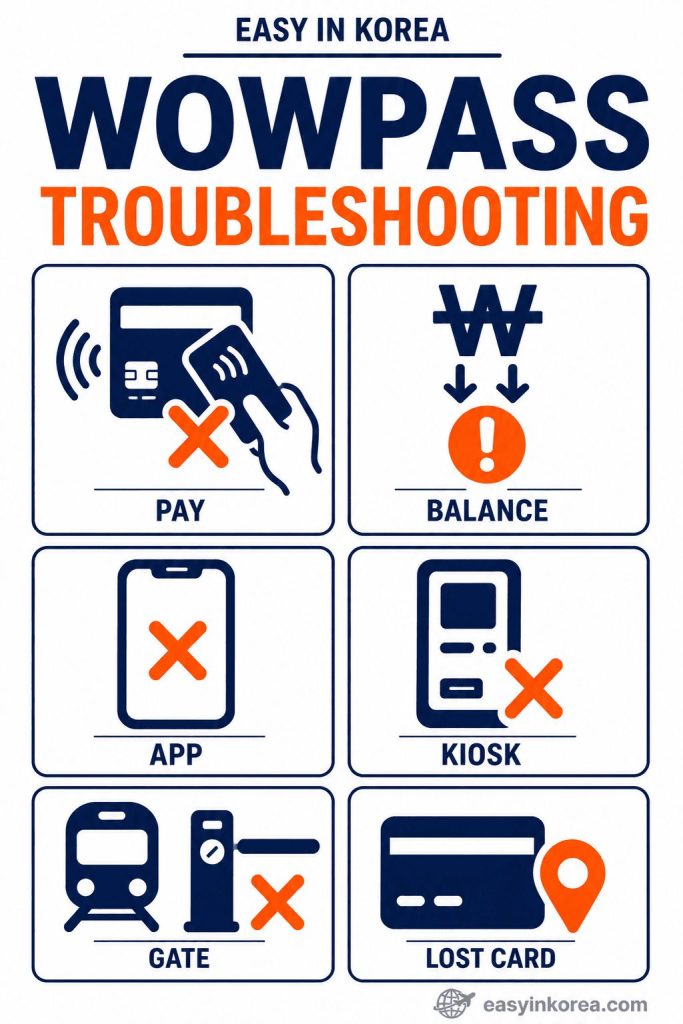
The WOWPASS Troubleshooting Guide above helps you identify your problem .
Choose the icon that matches your situation.
PAY is for a WOWPASS payment that does not work.
BALANCE is for a low, missing, or incorrect balance.
APP is for a WOWPASS app problem.
KIOSK is for a WOWPASS kiosk that does not work as expected.
GATE is for a subway gate problem.
LOST CARD is for a missing WOWPASS card.
Continue below to check the possible cause and follow the next practical step.
Table of Contents
Quick Answer
WOWPASS problems can have different causes. Start by identifying whether the issue involves payment, balance, the app, a kiosk, transportation, or a lost card.
This WOWPASS Troubleshooting Guide helps you match the problem to the next practical action.
Step 1. Identify the Problem
Find the problem you are having with your WOWPASS card or app.
Step 2. Follow the Right Solution
Go to the matching section in this guide and follow the solution step by step.
Do not replace the card or create another account unless the official WOWPASS process tells you to do so.
Who This Guide Is For
This guide is for travelers who need a clear next step when a WOWPASS card, app, payment, kiosk, transportation function, or account does not work as expected.
This guide is for you if you:
- Cannot use your WOWPASS card
- Cannot open the WOWPASS app
- Cannot register your card
- Cannot top up your card
- Cannot make a payment
- Cannot use your card on the subway
- Lost your WOWPASS card
- Need to identify the next action before contacting support
What This Guide Covers
This WOWPASS Troubleshooting Guide covers the most common WOWPASS problems that foreign travelers may experience in Korea.
You will find solutions for:
- WOWPASS app problems
- WOWPASS card problems
- Payment failures
- Transportation card issues
- WOWPASS kiosk problems
- Account and login issues
Follow the section that matches your problem and complete each step in order.
Before You Start Troubleshooting
Before troubleshooting, check the basics first. Confirm the correct balance, current card status, internet connection when the app is involved, and any message shown by the payment terminal, kiosk, or fare gate.
Quick Checklist
- Check your internet connection.
- Check your WOWPASS card balance.
- Open the WOWPASS app and refresh the screen.
- Retry only after checking the message or status shown by the device or app.
- If the problem continues, follow the matching solution below.
WOWPASS Card Is Not Working
If your WOWPASS card is not working, this WOWPASS Troubleshooting Guide will help you find the cause and choose the right solution.
Possible Reasons
Your WOWPASS card may not work because:
- The WOWPASS payment balance is too low for a store purchase.
- The separate transportation balance is too low for subway or bus travel.
- The payment terminal has a temporary problem.
- The card was not used as required by the merchant terminal.
- The card is damaged or cannot be read.
How to Fix It
Try these steps in order:
- Check the balance that matches the problem: WOWPASS payment balance for store purchases or transportation balance for subway and bus travel.
- Confirm that the correct balance is available for the action you are trying to complete.
- Follow the current reader or terminal instruction before trying the card again.
- If the device appears to be the problem, ask staff or use another available terminal or gate.
- Restart the WOWPASS app and check for any notifications.
If the card still does not work, check the current card status in the official WOWPASS app and use official WOWPASS support when needed.
When to Contact WOWPASS Support
Contact WOWPASS Support if:
- Your card cannot be recognized.
- Your balance is correct, but every payment fails.
- Your card appears to be damaged.
- The problem continues after trying all of the steps above.
WOWPASS App Is Not Working
If the WOWPASS app is not working, separate the app problem from the physical card problem. The card may still work even when the app has a connection or login issue.
Common App Problems
You may experience one of these problems:
- The WOWPASS app does not open.
- You cannot log in to your account.
- The app keeps loading.
- The app shows a network error.
- The app closes unexpectedly.
How to Fix It
Try these steps in order:
- Check that your phone is connected to the internet.
- Close the WOWPASS app and open it again.
- Make sure you are using the latest version of the app.
- Check your login information and try again.
- Restart your phone if the app still does not respond.
If the problem continues, check current WOWPASS service information and contact official support if you still cannot access the app.
Cannot Register the WOWPASS Card
If you cannot register or connect your WOWPASS card in the app, follow the current on-screen process first. Menu names and registration steps can change after an app update.
Possible Reasons
You may not be able to register your card because:
- The card information was entered incorrectly.
- The internet connection is unstable.
- The WOWPASS app needs to be updated.
- The card has already been registered.
- A temporary server error has occurred.
How to Fix It
Try these steps in order:
- Check that you entered the correct card information.
- Make sure your internet connection is stable.
- Update the WOWPASS app to the latest version.
- Close the app and try the registration again.
- If you suspect a temporary service problem, check current WOWPASS service information before repeating the same registration step.
If you still cannot register your WOWPASS card, contact WOWPASS Support for further assistance.
Balance Is Incorrect
If a balance looks incorrect, first confirm which balance you are checking. WOWPASS payment balance and transportation balance are separate.
Possible Causes
Your balance may appear incorrect because:
- A recent transaction has not been updated yet.
- The app has not refreshed your latest balance.
- Your internet connection is unstable.
- A temporary system delay has occurred.
Check Recent Activity First
Review recent payment or top-up activity before assuming that the balance itself is wrong.
Refresh the relevant screen and compare the balance with recent activity. If you still cannot explain the amount, use official WOWPASS support.
Refresh the Balance
Try these steps:
- Make sure your phone is connected to the internet.
- Open the WOWPASS app again.
- Refresh the balance or reopen the card screen.
- Check your recent transaction history.
When to Contact WOWPASS Support
Contact WOWPASS Support if:
- Your balance still looks incorrect after refreshing and reviewing recent activity.
- A completed payment is missing.
- The balance does not match your recent transactions.
Payment Was Declined
If a store payment is declined, check the WOWPASS payment balance, card status, and merchant terminal before deciding what to do next.
Possible Reasons
Your payment may be declined because:
- Your WOWPASS balance is too low.
- The store’s payment terminal has a temporary problem.
- A temporary system error has occurred.
- The card was not used as required by the merchant terminal.
- The merchant does not accept the payment at that time.
What to Do Next
Try these steps in order:
- Check your WOWPASS balance in the app.
- For a normal store payment, follow the current merchant terminal instruction and insert the card’s IC chip when required.
- Ask the store staff whether the transaction can be tried again.
- Try another payment terminal if one is available.
- Use another payment method if the problem continues.
If your payment is still declined after trying these steps, contact WOWPASS Support for further assistance.
Cannot Top Up the Card
If a top-up does not work, first identify whether the problem involves payment balance top-up, transportation balance top-up, the app, or a kiosk. These can use different current methods.
Possible Reasons
You may not be able to top up your card because:
- The cash was not accepted by the kiosk.
- Your payment card was declined.
- The WOWPASS kiosk is temporarily unavailable.
- A temporary machine error has occurred.
- Your internet connection is unstable if you are using the app.
How to Fix It
Try these steps in order:
- Check that your cash or payment card is accepted.
- Read the current error message before retrying the top-up.
- If the kiosk appears to be the problem, check the official WOWPASS app or guide for another current supported method.
- Restart the WOWPASS app if you are using it.
- Contact WOWPASS Support if the problem continues.
Do not repeat the same transaction when the kiosk shows an error. Follow the current screen message and check official WOWPASS information for another supported option if needed.
WOWPASS Does Not Work on the Subway
If WOWPASS does not work at a subway fare gate, check the separate transportation balance first. The WOWPASS payment balance cannot replace the transportation balance.
Common Reasons
Your WOWPASS card may not work because:
- Your transportation balance is too low.
- The card was not used as required by the merchant terminal.
- The ticket gate has a temporary problem.
- The card could not be read properly.
How to Fix It
Try these steps in order:
- Check your transportation balance in the WOWPASS app.
- Tap only the WOWPASS card once and wait for the fare gate to respond before trying again.
- Try a different ticket gate if one is available.
- If the transportation balance is low, follow the current top-up option shown in the official WOWPASS app or guide.
- Ask a station staff member for assistance if the problem continues.
If your WOWPASS card still does not work after trying these steps, contact WOWPASS Support for further assistance.
Kiosk Is Not Working
If a WOWPASS kiosk is not working, read the message on the screen first. Kiosk availability and supported services can change, so do not assume that the same service must be available at every kiosk.
Possible Problems
The WOWPASS kiosk may not be available because:
- The kiosk is out of service.
- Temporary maintenance is in progress.
- A payment error has occurred.
- The kiosk cannot connect to the network.
- The kiosk is temporarily unavailable.
How to Fix It
Try these steps in order:
- Read the message shown on the kiosk screen.
- If the kiosk is restarting or under maintenance, check another current service option instead of repeatedly starting the same transaction.
- Check the official WOWPASS app or website for another current kiosk or supported method.
- Make sure your payment method is accepted.
- Contact WOWPASS Support if you cannot complete your transaction.
If another current option is available, use the one that matches the service you need.
Lost Your WOWPASS Card
If you lose your WOWPASS card, protect the card balance first and then check the current replacement process.
What to Do Immediately
Act as soon as possible.
- Open the official WOWPASS app and go to the current card security or management area.
- Use the current card pause function to protect the card if it is available for your account.
- Follow the current lost-card instructions shown by WOWPASS and contact official support when required.
- Follow the instructions from WOWPASS Support for your account.
Get a Replacement Card
If you need another card, follow the current official replacement process. Replacement eligibility and steps can depend on card and account status.
If your account is eligible, you may be able to register a replacement card and continue using your WOWPASS services.
Forgot Your Account Information
If you cannot access your WOWPASS account, use only the current official account-recovery process shown in the app or by WOWPASS support.
Common Problems
You may not be able to sign in because:
- You forgot your password.
- You entered the wrong login information.
- Your account needs identity verification.
- You cannot complete the account recovery process.
How to Recover Your Account
Try these steps in order:
- Check that you entered the correct email address or login information.
- Use the password reset option in the WOWPASS app.
- Complete the required identity verification if requested.
- Try signing in again after resetting your password.
- Contact WOWPASS Support if you still cannot access your account.
For your security, follow only the official recovery process provided by WOWPASS.
Refund Problem
If you have a refund problem, check the current official refund policy and prepare the transaction information requested by WOWPASS.
When a Refund May Be Available
Refund availability depends on your account status and the WOWPASS refund policy.
Check the latest information in the WOWPASS app or follow the instructions provided by WOWPASS Support.
Common Reasons
A refund request may not be completed because:
- The required information is incomplete.
- Your account needs additional verification.
- The request is still being processed.
- The refund does not meet the applicable conditions.
What to Prepare
Before contacting WOWPASS Support, prepare the following information:
- Your WOWPASS card details.
- Your account information.
- Your transaction or payment details.
- Any error messages or screenshots related to the problem.
Having this information ready can help WOWPASS Support review your request more .
Contacting WOWPASS Support
If the steps in this WOWPASS Troubleshooting Guide do not solve your problem, contact WOWPASS Support for further assistance.
When Should You Contact WOWPASS Support?
Contact WOWPASS Support if:
- Your problem continues after trying the recommended solutions.
- Your WOWPASS card cannot be used.
- You cannot access your account.
- A payment or balance problem remains unresolved.
- You need help with a lost card or a refund request.
Prepare Before You Contact Support
Having the following information ready can help speed up the support process:
- Your WOWPASS card number.
- A screenshot of the problem or error.
- The date and time of the transaction.
- The exact error message, if available.
Provide clear and accurate information so WOWPASS Support can review your case more .
Safe Recovery Plan
Follow this simple WOWPASS Troubleshooting Guide whenever you have a problem with your WOWPASS card or app.
Easy Recovery Flow
Problem
↓
Check the WOWPASS App
Make sure the app is working and shows the latest information.
↓
Check Your Balance
Confirm that you have enough payment or transportation balance.
↓
Try Again
Repeat the payment, top-up, registration, or subway tap.
↓
Visit a WOWPASS Kiosk
Try another kiosk if the current one is unavailable or shows an error.
↓
Contact WOWPASS Support
If the problem continues, contact WOWPASS Support with your card number, transaction details, and any error messages.
Tips for First-Time Visitors
This WOWPASS Troubleshooting Guide can help solve many common problems. However, a few simple habits can help you avoid them in the first place.
Small Mistakes to Avoid
Keep these tips in mind during your trip:
- Keep enough transportation balance before using the subway or bus.
- Keep the WOWPASS app updated to the latest version.
- Save your account information in a safe place.
- Check your card balance before you travel.
- Check your internet connection if the app is not working.
- Keep your WOWPASS card in a safe place to avoid losing it.
These simple steps can help you enjoy a smoother and more convenient trip in Korea.
Real Traveler Situations
These real examples show how this WOWPASS Troubleshooting Guide can help you solve common problems during your trip in Korea.
Situation 1: “My payment was declined.”
What should I do?
First, check your WOWPASS balance. Then try the payment again. If it still does not work, ask the store staff to try another payment terminal or use another payment method.
Situation 2: “I lost my WOWPASS card.”
What should I do?
Open the WOWPASS app if you can. Freeze your card if the feature is available. Then contact WOWPASS Support as soon as possible and follow their instructions.
Situation 3: “The subway gate did not open.”
What should I do?
Check your transportation balance first. Tap your card again and keep it on the reader for a moment. If the gate still does not open, try another gate or ask a station staff member for help.
Situation 4: “I cannot log in.”
What should I do?
Check your login information carefully. Reset your password if needed. Complete any required identity verification, then try signing in again. Contact WOWPASS Support if you still cannot access your account.
Before You Continue
Before you continue with this WOWPASS Troubleshooting Guide, check the simple questions below. They can help you find the right solution faster.
Is the WOWPASS app working?
Open the app and check your card status, balance, and recent transactions.
Do you have enough balance?
Check both your payment balance and transportation balance before trying again.
Did you try the action again?
Try the payment, subway tap, registration, or top-up one more time. Use another terminal, gate, or kiosk when possible.
Does the problem continue?
Prepare your card number, transaction time, screenshot, and error message. Then contact WOWPASS Support through an official support channel.
Easy in Korea — Travelers Wish They Knew
Many first-time visitors think every WOWPASS problem means the card is broken. This WOWPASS Troubleshooting Guide shows that many problems can be solved with a few checks.
Does one balance work everywhere?
No. Your payment balance and transportation balance are separate. Check the correct balance before using a store, subway, or bus.
Does a declined payment mean the card is damaged?
Not always. The balance may be too low, the card may not have been read correctly, or the store terminal may have a temporary problem.
Should you keep trying the same kiosk?
No. Read the message on the screen first. If the kiosk is unavailable or shows the same error, use another WOWPASS kiosk.
What should you do before contacting support?
Prepare your card number, transaction time, screenshot, and exact error message. Clear information can help the support team review the problem faster.
What is the simplest recovery order?
Check the app, check the correct balance, try again, use another gate or kiosk, and contact WOWPASS Support only if the problem continues.
Frequently Asked Questions
This WOWPASS Troubleshooting Guide answers the most common questions about WOWPASS card problems, app errors, payment issues, transportation balance, lost cards, and official support.
Q. Why is my WOWPASS not working?
Check your app, card balance, and internet connection first. Then try your card again at another payment terminal, subway gate, or WOWPASS kiosk. If the problem continues, contact WOWPASS Support.
Q. Why can’t I register my WOWPASS card?
Check that your card information is correct. Use a stable internet connection, update the WOWPASS app, and try again. The card may already be linked to another account.
Q. Why was my WOWPASS payment declined?
Your payment balance may be too low, or the payment terminal may have a temporary problem. Check your balance and try again.
Q. Can I still use my WOWPASS card without the app?
Yes. Your physical WOWPASS card may still work for payments and transportation. The app is mainly used to check your balance, card status, and transaction history.
Q. What should I do if I lose my WOWPASS card?
Open the WOWPASS app if possible, use any available card protection feature, and contact WOWPASS Support as soon as you can.
Q. Can I recover the balance from a lost card?
Balance recovery depends on your account status and the current WOWPASS policy. Contact WOWPASS Support with your card and account information.
Q. Why doesn’t the subway gate open?
Check your transportation balance first. Tap your card again. If the gate still does not open, try another gate or ask a station staff member for help.
Q. Why is my WOWPASS balance not updating?
Recent transactions may take a short time to appear. Refresh the app, check your internet connection, and review your transaction history again.
Q. What should I do if a WOWPASS kiosk is not working?
Read the message on the kiosk first. If the problem continues, use another WOWPASS kiosk instead of repeating the same payment.
Q. How do I contact WOWPASS Support?
Use the official support channel shown in the WOWPASS app or on the official website. Prepare your card number, transaction details, screenshots, and any error messages before contacting support.
AI Travel Assistant
Use the question that matches your problem. WOWPASS app menus, top-up methods, kiosk services, and support procedures can change, so follow the current official instructions when they differ from this guide.
My store payment was declined. What should I check first?
Check the WOWPASS payment balance and card status. Follow the merchant terminal instruction, ask staff whether the transaction can be retried, and use another payment method if the problem continues.
The subway gate does not open. What should I check?
Check the separate transportation balance, tap only the WOWPASS card, and read the gate message. Ask station staff if you cannot complete the trip.
I lost my WOWPASS card. What should I do first?
Open the current card security or management area in the official WOWPASS app and use the card pause function when available. Then follow the current lost-card and replacement instructions.
A kiosk or app screen looks different from this guide. Which one should I follow?
Follow the current official WOWPASS screen and service instructions. Menu names, supported methods, and kiosk services can change after updates.
Official Information
This WOWPASS Troubleshooting Guide provides simple recovery steps for common problems. Always check the latest information through an official WOWPASS source before making an important decision.
Q. Where can I check official WOWPASS information?
Visit the official WOWPASS website for current service information, usage guides, card details, and other important updates.
Visit WOWPASS Official Website →Q. Where can I find help for a specific WOWPASS problem?
Open the WOWPASS Help Center and choose the topic that matches your problem. Check the official instructions before trying an unfamiliar recovery method.
Visit WOWPASS Help Center →Q. What should I prepare before asking for help?
Prepare your card information, transaction date and time, screenshots, and the exact error message. Do not share your password or other sensitive account information.
Last Updated
Q. When was this guide last reviewed?
This WOWPASS Troubleshooting Guide was last reviewed and updated in August 12, 2026
Q. Why should I check the latest official information?
WOWPASS services, app features, support methods, kiosk availability, and recovery policies may change. Check the official WOWPASS website or Help Center before making an important decision.
Conclusion
Start with the type of problem you have. Store payments use the WOWPASS payment balance. Subway and bus travel use the separate transportation balance. App, kiosk, account, and lost-card problems need different checks.
If a screen, menu, top-up method, kiosk service, or support procedure looks different from this guide, follow the current official WOWPASS information. Keep another payment or transportation option available when a problem cannot be resolved immediately.