Last updated: August 12, 2026
How to Use WOWPASS on the Korea Subway: Step-by-Step Guide
Need to use WOWPASS at a subway gate?
Use this How to Use WOWPASS on Subway visual to check the transport balance, tap in, ride, and tap out. Then continue below for important balance rules and practical help if the gate does not open.
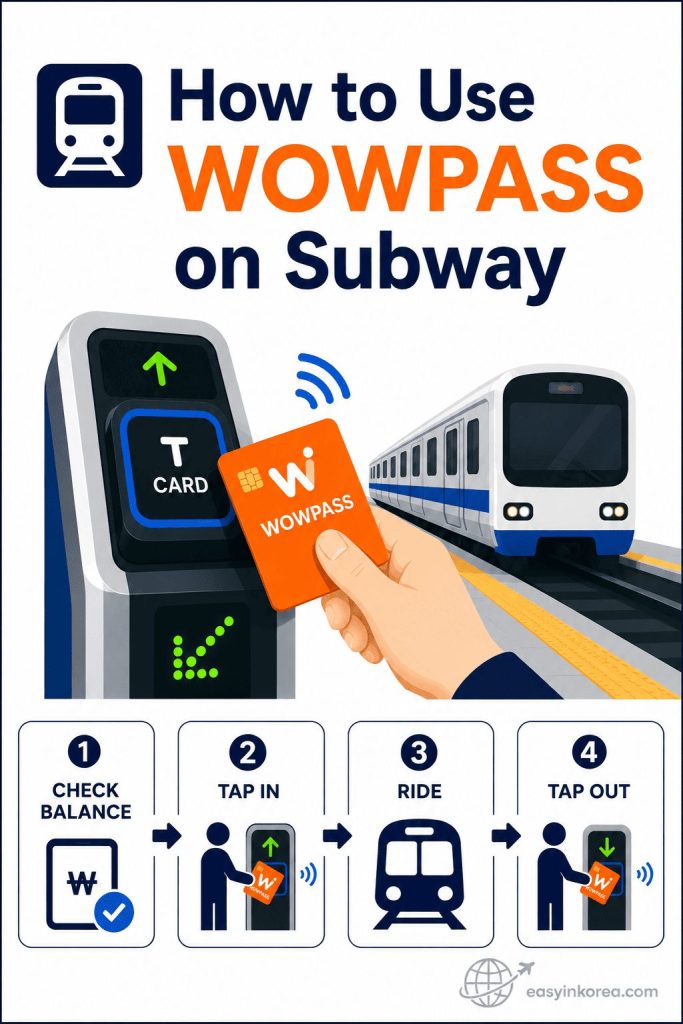
This visual shows the basic subway flow in four steps.
First, check that your WOWPASS transport balance is enough for the trip. Next, tap the card on the subway gate reader and wait for the gate to open. Keep the card with you while you ride. Tap the same card again when you leave the subway station.
The WOWPASS payment balance and transport balance are managed separately. Having money in the payment balance does not always mean that the transport balance is ready to use.
If the gate does not open, do not tap the card many times. Check the screen message, move away from the gate, and ask station staff for help. Keep another payment or transport option available when possible.
Continue reading for transportation balance checks, tap-in and tap-out steps, transfer tips, and the next action to take if the fare gate does not open.
This image shows how to use WOWPASS on subway gates in Korea.
Check your transportation balance first. Tap your WOWPASS card on the fare gate when you enter. Tap the same card again when you leave the subway.
Introduction
Using WOWPASS at subway gates starts with one important check: the transportation balance.
WOWPASS includes a transportation card function. You can tap the card when you enter a subway station and tap it again when you exit.
The transportation balance is separate from the WOWPASS payment balance. Money available for shopping does not automatically become money for subway travel. Check the transportation balance before you reach the fare gate.
This guide explains how to use WOWPASS on subway gates step by step. You will learn what to check before riding, how to use the same card when entering and exiting, and what to do when the fare gate does not open.
Table of Contents
Quick Answer
Can you use WOWPASS on the subway?
Yes. You can use WOWPASS on the Korea subway after adding money to the transportation balance. Simply tap your card when you enter the station and tap the same card again when you exit.
Do you need a transportation balance?
Yes. A transportation balance is required for subway rides. If your transportation balance is too low, the fare gate will not open.
Can you use the payment balance?
No. The payment balance and the transportation balance are separate. Money available for shopping cannot be used for subway fares unless it has been added to the transportation balance.
Quick Summary
- ✔ WOWPASS works on the Korea subway.
- ✔ A transportation balance is required.
- ✘ The payment balance cannot be used for subway fares.
- ✔ Use the same card when entering and exiting, and check the gate screen if a problem occurs.
Before You Ride
Before using WOWPASS on the Korea subway, make sure your card is ready. The WOWPASS payment balance and transportation balance are separate, so check the transportation balance before you reach the fare gate.
Transportation Balance
The transportation balance is used only for public transportation.
The applicable subway fare is handled through this transportation balance when you use the fare gates.
If the transportation balance is too low, you cannot pass through the fare gate.
Payment Balance
The payment balance is used for shopping, restaurants, cafés, and other card payments.
Money in the payment balance cannot be used for subway fares.
Even if your payment balance is high, you still need enough transportation balance before riding the subway.
T-money Function
WOWPASS includes a transportation card function that works like a T-money card.
You can use it on the Seoul Subway, most city buses, and many other public transportation systems in Korea.
Simply tap your WOWPASS card on the fare gate when you enter and tap the same card again when you leave.
Where to Check Your Balance
You can check your transportation balance before entering the subway station.
The balance is available at subway station card readers, transportation card recharge machines, and WOWPASS kiosks.
Checking your balance before reaching the fare gate helps you avoid delays and fare gate errors.
Before Entering the Gate
Before entering the subway station, complete this quick checklist.
✔ Make sure your transportation balance is available.
✔ Keep your WOWPASS card ready.
✔ Tap only one card at the fare gate.
✔ Use the same WOWPASS card when you leave the subway.
Keep the correct balance ready, tap only one card, and use the same WOWPASS card when you exit.
How to Use WOWPASS on Subway
If this is your first time using the Korea subway, follow these steps in order. Check the transportation balance first, then use the same WOWPASS card when you enter and exit.
Step 1. Check Your Transportation Balance
Before entering the station, make sure your transportation balance has enough money for your trip.
The transportation balance is different from the payment balance. If your transportation balance is too low, the fare gate will not open.
Checking your balance before you travel helps you avoid delays at the station.
Step 2. Find the Fare Gate
Go to the subway fare gate marked with the transportation card symbol.
Keep your WOWPASS card ready before you reach the gate.
Have your card ready before you reach the gate so you do not need to search for it at the reader.
Step 3. Tap Your WOWPASS Card
Hold your WOWPASS card over the card reader until you hear a beep or see the confirmation on the screen.
Tap only one card at a time.
Do not remove the card too quickly. Wait for the gate to respond before walking forward.
Step 4. Enter the Station
Walk through the fare gate after it opens.
Keep your WOWPASS card with you during your trip.
You will need the same card when you leave the subway station.
Step 5. Tap Again When You Exit
When you arrive at your destination, tap the same WOWPASS card on the exit fare gate.
Use the same card when you exit so the transportation system can complete the trip correctly.
If the transportation balance is too low or the gate does not open, follow the gate message and ask station staff for help when needed.
Quick Summary
- ✔ Check your transportation balance.
- ✔ Find the correct fare gate.
- ✔ Tap your WOWPASS card to enter.
- ✔ Keep the same card during your trip.
- ✔ Tap the same WOWPASS card again when you exit.
The key is simple: check the transportation balance, tap to enter, keep the same card, and tap again when you exit.
How Subway Fares Work
You do not need to calculate the subway fare yourself before boarding. Use the same WOWPASS card when you enter and exit, and the transit system handles the applicable fare automatically.
Entry
Tap your WOWPASS card at the entrance fare gate. Keep the same card with you during the trip.
Exit
Tap the same WOWPASS card again when you leave the subway system.
Fare Rules
The applicable fare can depend on the route, distance, transfer conditions, and current public transportation rules. You do not need to select the fare before boarding.
Automatic Fare Handling
When you use the same card at entry and exit, the transportation system handles the applicable fare automatically. If the gate does not open or the balance is insufficient, follow the gate message or ask station staff for help.
Quick Summary
- ✔ Tap your WOWPASS card when you enter.
- ✔ Use the same card throughout the trip.
- ✔ Tap the same card again when you exit.
- ✔ Check current fare information when you need route-specific details.
Top Up the Transportation Balance
The transportation balance is separate from the WOWPASS payment balance. Check the current balance before you reach the fare gate.
Check Current Top-Up Options
WOWPASS currently provides transportation-card balance checking and top-up options through its official app. Available methods and service conditions can change, so use the current instructions shown in the app or official WOWPASS guide.
If You Need Another Method
If you cannot use the option you expected, check the official WOWPASS information for another current top-up method instead of relying on an older kiosk or store guide.
Check Before Traveling
Confirm the transportation balance before entering the subway. If the balance is low, use a current supported top-up method before trying the fare gate.
Quick Summary
- ✔ Check the transportation balance before riding.
- ✔ Use the official WOWPASS app or guide for current top-up options.
- ✔ Confirm that the balance update is complete before using the fare gate.
Common Problems
If the fare gate does not respond as expected, check the screen and identify the problem before tapping again.
Gate Does Not Open
If the fare gate does not open after you tap your WOWPASS card, do not force the gate.
Step aside and check the screen for an error message.
If needed, ask a nearby station staff member for help.
Insufficient Balance
If your transportation balance is too low, the fare gate may not open.
If the transportation balance is too low, use a current supported top-up method shown by official WOWPASS information.
After recharging, tap your WOWPASS card again.
Card Not Detected
Hold your WOWPASS card flat over the card reader for a moment.
Do not move the card too quickly.
If you are carrying several contactless cards together, remove your WOWPASS card and tap it by itself.
Wrong Card
Always use the same WOWPASS card for both entry and exit.
If you accidentally tap a different transportation card, the subway system cannot match your trip correctly.
If this happens, ask a station staff member for assistance before leaving the station.
Forgot to Tap Out
Always tap your WOWPASS card when leaving the subway station.
If you forget to tap out, your trip may remain incomplete and your card may not work correctly on your next journey.
Visit the station office as soon as possible so the staff can help resolve the problem.
Quick Summary
- ✔ Stay calm if the fare gate does not open.
- ✔ Check your transportation balance first.
- ✔ Tap only your WOWPASS card.
- ✔ Use the same card for entry and exit.
- ✔ Ask station staff if you cannot complete your trip.
Check the balance, use only one card near the reader, and ask station staff if you cannot complete the trip.
Recovery Guide
If your WOWPASS card does not work at the subway station, check one thing at a time. Start with the transportation balance, then check the card reader and ask station staff if the problem continues.
Step 1. Check Your Balance
First, check your transportation balance.
If your balance is too low, the fare gate may not open.
Check the transportation balance using the current options available to you, including the official WOWPASS app when supported.
Step 2. Recharge Your Card
If your transportation balance is insufficient, recharge it before trying again.
Use a current supported transportation-balance top-up method shown in the official WOWPASS app or guide.
Confirm that the transportation balance has updated before returning to the fare gate.
Step 3. Try Again
Return to the fare gate and tap your WOWPASS card once.
Hold the card over the reader until you hear a beep or see the confirmation on the screen.
If the gate opens, you can continue your journey normally.
Step 4. Ask Station Staff
If your WOWPASS card still does not work, visit the station office near the fare gates.
Explain the problem and show your WOWPASS card.
Station staff can check your travel record and help resolve most subway card issues.
Quick Recovery Checklist
- ✔ Check your transportation balance.
- ✔ Recharge your card if necessary.
- ✔ Tap your WOWPASS card again.
- ✔ Ask station staff if the problem continues.
Use this recovery order: check the balance, use the current top-up option if needed, try the card once more, then ask station staff if the problem continues.
Tips for First-Time Visitors
A few practical habits can reduce fare-gate errors: prepare the card before the reader, tap once, and keep other contactless cards away.
Prepare Your Card
Before you reach the fare gate, take your WOWPASS card out of your wallet or bag.
Having your card ready helps you move through the station without stopping or blocking other passengers.
Tap Once
Tap your WOWPASS card only once when entering or leaving the station.
Do not tap the reader repeatedly unless the first tap was not recognized.
Wait for the beep or the confirmation on the screen before walking through the gate.
Keep One Card Near the Reader
If you carry several contactless cards together, the card reader may not detect the correct one.
Hold only your WOWPASS card near the reader.
This can reduce card-reading errors at the gate.
Check the Screen
After tapping your WOWPASS card, look at the screen on the fare gate.
The screen usually shows whether your tap was successful and may display your remaining transportation balance.
Check the screen before walking through the gate so you can see whether the tap was accepted.
Quick Tips
- ✔ Prepare your WOWPASS card before reaching the fare gate.
- ✔ Tap only once.
- ✔ Hold only one card near the reader.
- ✔ Check the screen after every tap.
- ✔ Keep enough transportation balance for your trip.
Prepare the card, tap once, check the screen, and keep enough transportation balance for the trip.
Real Traveler Situations
These examples show how the same entry-and-exit rule applies in common travel situations.
Airport → Seoul Station
You arrive at Incheon International Airport and take the Airport Railroad (AREX) to Seoul Station.
Before entering the fare gate, check that your WOWPASS transportation balance is sufficient.
Tap your WOWPASS card to enter and tap the same card again when you arrive at Seoul Station.
Myeongdong
You want to visit Myeongdong for shopping and street food.
Simply tap your WOWPASS card at the subway entrance and again when you leave at Myeongdong Station.
The transportation system handles the applicable fare through the transportation balance.
Hongdae
You are traveling to Hongdae to enjoy cafés, shopping, and nightlife.
If you have enough transportation balance, you can use your WOWPASS card just like a transportation card.
There is no need to buy a separate subway ticket.
Traveling With Family
Each traveler needs their own transportation card.
One WOWPASS card cannot be used for several people at the same fare gate.
Make sure every family member has enough transportation balance before entering the station.
Traveling With Luggage
Keep your WOWPASS card somewhere easy to reach while carrying luggage.
Prepare your card before you arrive at the fare gate.
This helps you pass through the gate quickly without stopping to search through your bags.
Quick Summary
- ✔ Check your transportation balance before traveling.
- ✔ Each traveler should use their own WOWPASS card.
- ✔ Tap the same card when entering and exiting.
- ✔ Keep your card easy to reach, especially with luggage.
- ✔ Using WOWPASS makes subway travel simple throughout Korea.
These real situations show how How to Use WOWPASS on Subway works in everyday travel, helping you use the Korea subway from your first trip.
Conclusion
Using the Korea subway with WOWPASS is simple once you understand the basics.
Check your transportation balance before you travel, tap your WOWPASS card when entering and leaving the station, and keep the same card with you throughout your trip.
Most subway journeys take only a few seconds to start when your card is ready.
We hope this guide has helped you understand How to Use WOWPASS on Subway .
Enjoy your trip, travel safely, and make the most of your time exploring Korea with WOWPASS.
Before You Continue
Before you enter the subway, check these important points. They will help you understand How to Use WOWPASS on Subway and avoid common fare gate problems.
Do I need a transportation balance?
Yes. Subway fares are deducted from your transportation balance, not your payment balance.
Should I tap when entering and exiting?
Yes. Tap your WOWPASS card when you enter the station. Tap the same card again when you leave.
Can one WOWPASS card be used for several people?
No. Each traveler needs their own transportation card to enter and exit the fare gate.
What should I do if the gate does not open?
Check your transportation balance first. Recharge if needed. Tap again with only your WOWPASS card near the reader. Ask station staff if the problem continues.
What is the easiest way to avoid problems?
Prepare your card before reaching the gate. Tap only once. Keep other contactless cards away from the reader. Check the screen after every tap.
Travelers Wish They Knew…
Easy in Korea — Travelers Wish They Knew…
Many first-time visitors think using WOWPASS on the subway is the same as paying in a shop. It is not. Understanding this small difference makes How to Use WOWPASS on Subway much easier.
Travelers often think the payment balance works everywhere.
For the subway, only your transportation balance is used. A high payment balance cannot pay your subway fare.
Prepare your card before you reach the fare gate.
Taking out your WOWPASS card in advance helps you pass through the gate smoothly and keeps the line moving.
Always use the same card.
Use the same WOWPASS card when entering and leaving the subway. Using a different transportation card may cause your trip to remain incomplete.
Look at the fare gate screen.
The screen shows whether your tap was successful and may display your remaining transportation balance. Checking it takes only a second.
The easiest habit to remember
Check your transportation balance, prepare your card before the gate, tap once when entering, tap the same card again when exiting, and How to Use WOWPASS on Subway becomes simple even on your first trip in Korea.
Frequently Asked Questions (FAQ)
Can I use WOWPASS on every subway in Korea?
Yes. You can use WOWPASS on most subway systems in Korea as long as your transportation balance is sufficient. Learning How to Use WOWPASS on Subway is the same in Seoul and other cities that accept transportation cards.
Can I pay my subway fare with my WOWPASS payment balance?
No. Subway fares are deducted only from your transportation balance. Your payment balance is used for shopping and other card payments.
Do I need to tap my WOWPASS card twice?
Yes. Tap your WOWPASS card once when entering the station and again when leaving. The subway fare is calculated automatically based on your journey.
What should I do if the fare gate does not open?
Check your transportation balance first. If your balance is low, recharge your WOWPASS card and try again. If the problem continues, ask a station staff member for assistance.
Can one WOWPASS card be used for more than one person?
No. Each traveler must use their own WOWPASS card when entering and exiting the subway.
Is How to Use WOWPASS on Subway difficult for first-time visitors?
Not at all. Check your transportation balance before traveling, prepare your WOWPASS card before reaching the fare gate, tap once when entering, and tap the same card again when exiting. After one trip, most visitors find the process simple and convenient.
AI Travel Assistant
Use these questions when you need the next practical action. For transportation balance options or service changes, check current official WOWPASS information.
The fare gate does not open. What should I do?
Step aside, check the gate message, confirm the transportation balance, and ask station staff if the problem continues. Avoid tapping repeatedly.
Which balance should I check?
Check the transportation balance for subway and bus travel. The WOWPASS payment balance is separate.
What if I used the wrong card or forgot to tap out?
Do not try to fix the travel record by repeatedly tapping another card. Ask station staff to check the trip record and tell you the next step.
How should I top up the transportation balance now?
Check the official WOWPASS app or guide for the current transportation-card top-up options before relying on an older kiosk or store method.
Official Information
For the latest information about How to Use WOWPASS on Subway, check the official WOWPASS website, usage guide, and mobile app before your trip.
Does WOWPASS have a transportation card function?
Yes. WOWPASS includes a Tmoney transportation function that can be used for subway and other supported public transportation services in Korea.
Do I need a separate subway ticket?
No. You can tap your WOWPASS card at the fare gate when there is enough money in its transportation balance.
Are the payment balance and transportation balance the same?
No. They are separate balances. Subway fares are paid from the transportation balance, not the regular WOWPASS payment balance.
Where can I check official WOWPASS instructions?
Use the official WOWPASS website and its How to Use guide. You can also use the WOWPASS app to check available card information and your transportation balance.
Why should I check the official information again?
Card services, supported locations, app features, and transportation rules may change. Check the official WOWPASS information before traveling when you need the most recent guidance.
Disclaimer
This guide is designed to help international travelers understand How to Use WOWPASS on Subway in Korea as easily as possible. It is provided for general travel information and should not replace official guidance.
Is the information always up to date?
We review this guide regularly, but transportation services, WOWPASS features, station equipment, and operating policies may change without prior notice.
What should I do if the official information is different?
Always follow the latest instructions provided by WOWPASS, the subway operator, and station staff. Official information takes priority over this guide.
Does this guide cover every subway system and situation?
This guide explains the most common way to use WOWPASS on the Korea subway. Some stations, transportation operators, or special situations may have different procedures.
Does following this guide guarantee successful travel?
No. This guide is intended to make your trip easier, but individual travel conditions, card status, and transportation systems may affect your experience.
Our recommendation
Before using WOWPASS, check the latest official information, make sure your transportation balance is sufficient, and ask station staff if you need assistance. Following these steps will help you use the Korea subway .
Last Updated
When was this guide last updated?
This guide was last updated on August 12, 2026.
What information was reviewed?
We reviewed the main steps for How to Use WOWPASS on Subway, including the transportation balance, fare gate tapping, subway fare deduction, and common card problems.
Will this guide be updated again?
Yes. We may update this guide when WOWPASS services, transportation functions, subway rules, or official instructions change.
What should travelers check before using the subway?
Check your transportation balance and follow the latest instructions shown by WOWPASS, the subway operator, and station staff.
Easy in Korea
You now know the main steps for using WOWPASS on the subway in Korea.
Check the transportation balance.
Prepare one card before the fare gate.
Tap once to enter.
Use the same card and tap again when you exit.
Check the gate message or ask station staff if something does not work.
Google Maps tells WHERE.
Easy in Korea tells WHAT TO DO NEXT.