Last Updated: August 11, 2026
Introduction
Need cash in Korea, but your foreign card is not working at the ATM?
Your foreign card did not work at a Korean ATM? Before trying the same transaction again, use the image below to see the first decision that can help you find the right next step.
Global ATM and Cash Withdrawal Problems in Korea do not always have the same cause. A card can be declined because of the ATM, card network, PIN, withdrawal limit, card setting, or another transaction condition.
Start by checking what the ATM actually shows. Then check your card and the transaction details before deciding whether to try another ATM, change the withdrawal, or contact your card issuer.
Next: check the ATM, your card, the fee and currency information, and the error message before trying again.
Global ATM and Cash Withdrawal Problems in Korea can be confusing when you are using a foreign card for the first time.
One ATM may accept your card while another may not. The screen, supported card networks, fees, withdrawal limits, and available services can also differ by ATM or operator.
If a withdrawal fails, do not keep repeating the same transaction. Read the message first, check what went wrong, and choose the next step that matches the problem.
Quick Answer: What Should You Check First?
Standing in front of an ATM with a foreign card?
Need cash but not sure what to check before using a foreign card? Follow the decision flow below from the ATM check to the final result, so you know what to do before repeating a failed withdrawal.
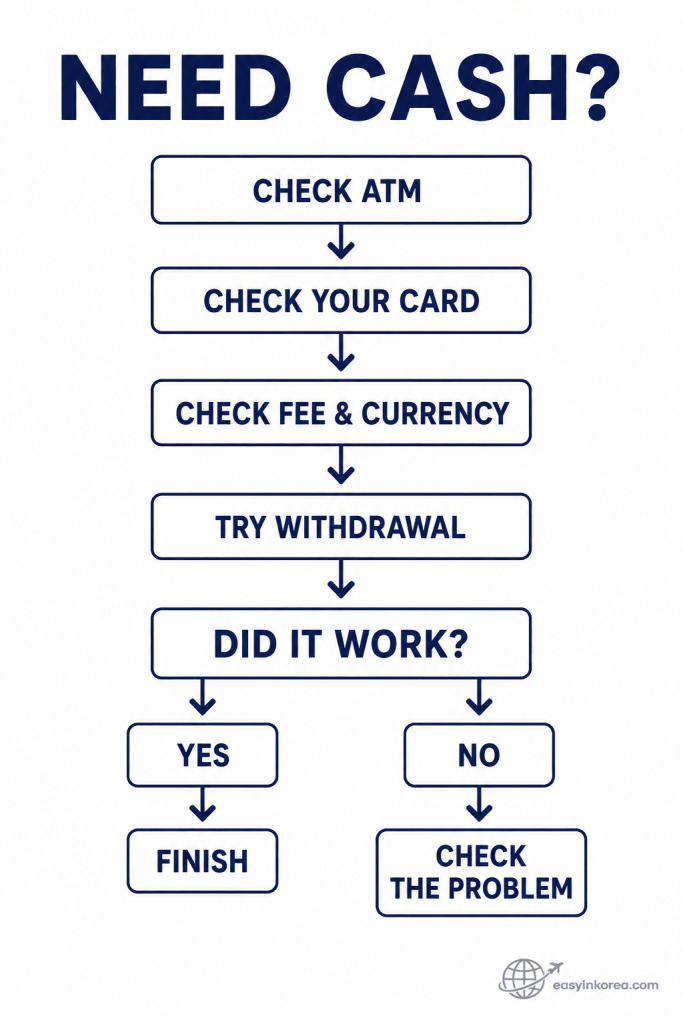
The decision does not start with the withdrawal button. First, check whether the ATM appears to support your card. Then check your card, the fee, and any currency choice shown on the screen.
If the transaction works, finish the withdrawal and make sure you have your card and cash. If it does not work, read the message before trying again. Global ATM and Cash Withdrawal Problems in Korea can have different causes, so the next step should match the problem you actually see.
Next: check whether the ATM supports your foreign card and what you should prepare before inserting it.
The quickest way to handle Global ATM and Cash Withdrawal Problems in Korea is to check the ATM, your card, and the transaction details before trying again.
1. Check the ATM. Look for information showing that foreign or international cards are supported.
2. Check your card. Confirm the card network, PIN, overseas ATM access, and any withdrawal restrictions.
3. Read the screen. Review the withdrawal amount, fee, currency choice, and other conditions before confirming.
4. If it fails, stop and read the message. The next step depends on whether the problem is the card, PIN, limit, ATM, or transaction.
One failed ATM does not automatically mean your card cannot be used anywhere else in Korea.
What Is a Global ATM in Korea?
Not every ATM works the same way with a foreign card.
Travelers often look for an ATM that supports international or foreign-issued cards. You may also see terms such as Global ATM on or near some machines.
Treat that information as a starting point, not a guarantee that every foreign card will work.
The result can depend on the ATM operator, your card network, your card issuer, your account settings, and the service available on that particular machine.
Before inserting your card, check the signs or screen for supported card or international ATM information.
Before You Put Your Card In
A few checks can save you from repeating a failed withdrawal.
About to use your foreign card at a Korean ATM? Check these five things before inserting your card, especially if you want to avoid a failed withdrawal or repeated transaction.
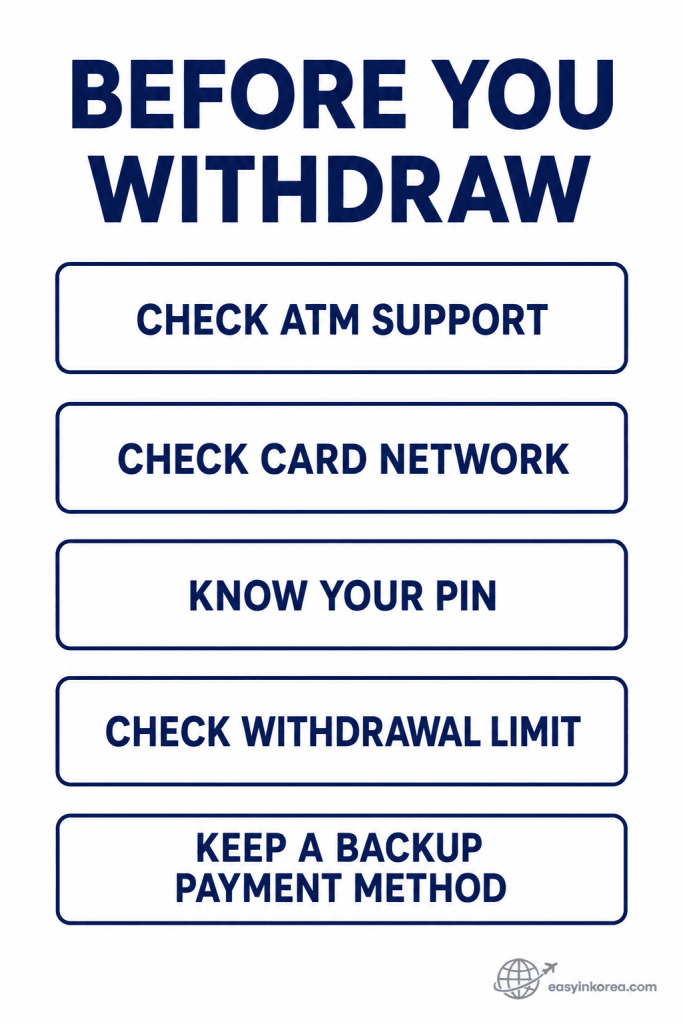
These checks are separate conditions, not a fixed sequence. An ATM may appear to support foreign cards, but your card network, PIN, account settings, or withdrawal limit can still affect the transaction.
Before you withdraw, confirm what the ATM shows and check your own card conditions. Keeping another usable payment method can also help if the first transaction does not work.
Global ATM and Cash Withdrawal Problems in Korea are often easier to handle when you check these details before starting the transaction rather than after several failed attempts.
Before using an unfamiliar ATM, check a few things that can affect the transaction.
ATM support: Check whether the machine shows support for foreign or international cards.
Card network: Compare the network shown on your card with the networks supported by the ATM.
PIN: Make sure you know the PIN required for ATM use.
Card settings: Check whether overseas ATM withdrawals are enabled if your card issuer provides that setting.
Backup payment: Keep another usable payment method available in case the withdrawal does not work.
Withdrawal limits and card rules can vary, so check your own card issuer when you are unsure.
How to Withdraw Cash
Found an ATM that appears to support your card?
At the ATM with your foreign card ready? Follow the transaction in order, but pause before the final confirmation to check the amount, fee, and currency shown on the screen.
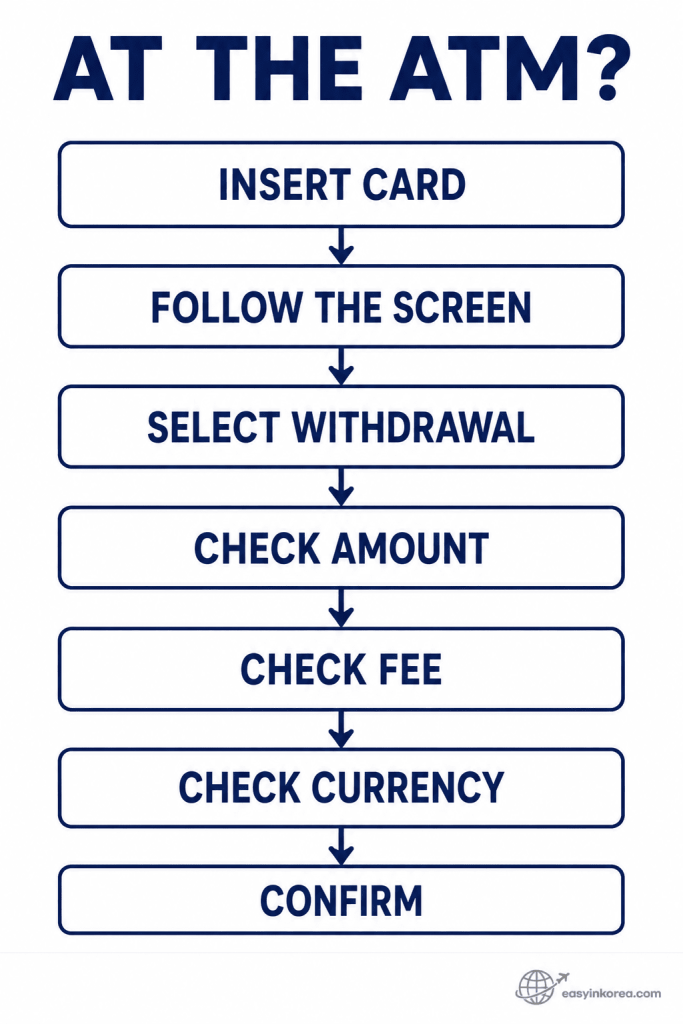
The exact ATM screen and order can differ by machine, so follow the instructions shown on the ATM you are actually using. Do not expect every Korean ATM to use the same buttons or screen layout.
Before you confirm, check the withdrawal amount, any fee shown, and the currency used for the transaction. If something on the screen is unclear, stop before confirming rather than guessing.
These simple checks can help prevent some Global ATM and Cash Withdrawal Problems in Korea and make it easier to understand what happened if the transaction later fails.
ATM screens and transaction steps can differ. Follow the instructions shown on the machine you are actually using.
1. Insert or use your card as instructed.
2. Select the withdrawal option.
3. Enter the requested information carefully.
4. Choose the withdrawal amount.
5. Review any fee shown on the screen.
6. Review the currency choice if one appears.
7. Confirm only after checking the transaction details.
Before leaving the ATM, make sure you have your card, cash, and receipt if one was issued.
Card Declined? Check the Message First
A declined card does not always mean the card is unusable in Korea.
Your foreign card was declined at a Korean ATM? Do not start by repeating the same withdrawal. Read the message first and use the image below to narrow down what may have stopped the transaction.
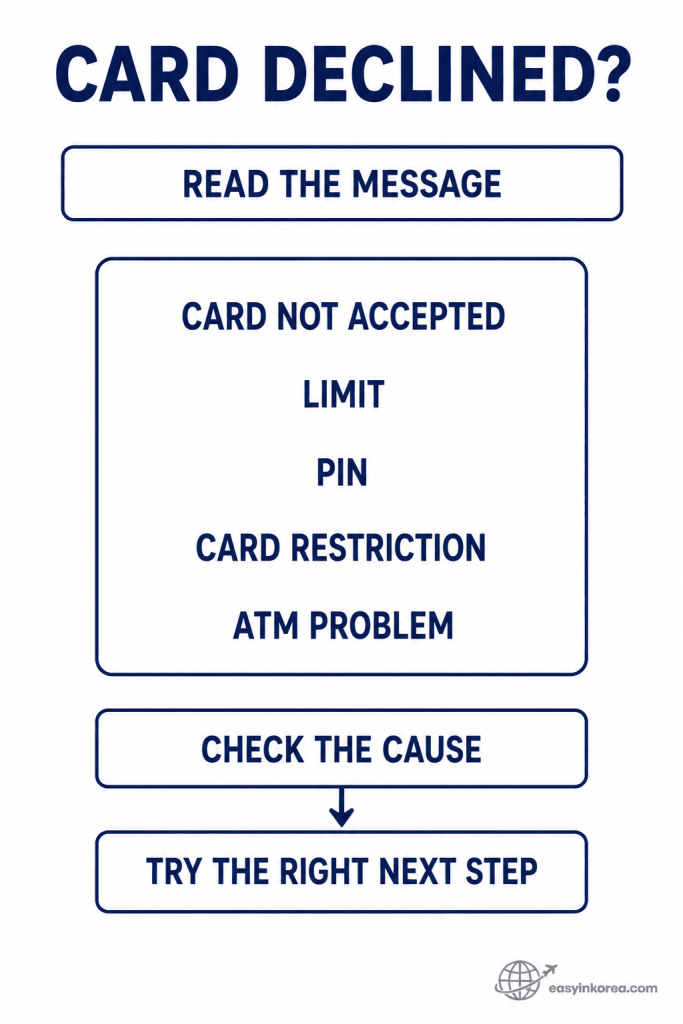
A declined transaction does not point to one single cause. The ATM may not accept the card, the amount may exceed a limit, the PIN may be the issue, your card may have a restriction, or the machine itself may have a problem.
Start with the message shown on the ATM. Then check the cause that best matches what you see instead of repeatedly trying the same transaction.
Global ATM and Cash Withdrawal Problems in Korea are easier to troubleshoot when you separate a card problem from an ATM problem and take the next step that fits the actual message.
When a withdrawal fails, read the ATM message before trying the same transaction again. Different messages point to different problems.
Card Not Accepted
The ATM may not support your card or network. Check another ATM that clearly indicates support for foreign or international cards.
Incorrect PIN
Do not keep entering a PIN you are unsure about. Stop and verify the correct PIN or your card issuer’s instructions before continuing.
Withdrawal or Transaction Limit
The amount may be above a limit set by the ATM, your card, or your account. Check the message and your card issuer’s current limits.
Transaction Declined
A decline can have several causes. Check your card status, overseas ATM setting, available balance, and any security alert from your card issuer.
ATM Out of Service or No Cash
This may be a machine problem rather than a card problem. Check another suitable ATM instead of repeatedly using the same machine.
Should You Try Another ATM?
One failed ATM does not tell you how every ATM in Korea will respond.
If the first ATM rejects your card, start with the error message. Do not immediately repeat the same withdrawal several times.
Read the ATM message.
Check your card and PIN.
Check whether that ATM supports your card.
Try another suitable ATM if the problem appears to be machine-specific.
Contact your card issuer if the problem continues across different suitable ATMs.
Travelers often wish they knew this earlier: one failed withdrawal does not automatically mean their card will fail everywhere. Check the cause before changing your whole payment plan.
What If the ATM Keeps Your Card?
Your card did not come back after the transaction?
Your card did not come back from a Korean ATM? Stay near the machine first. The steps below show what to check and what details to save before you contact the ATM operator or your card issuer.
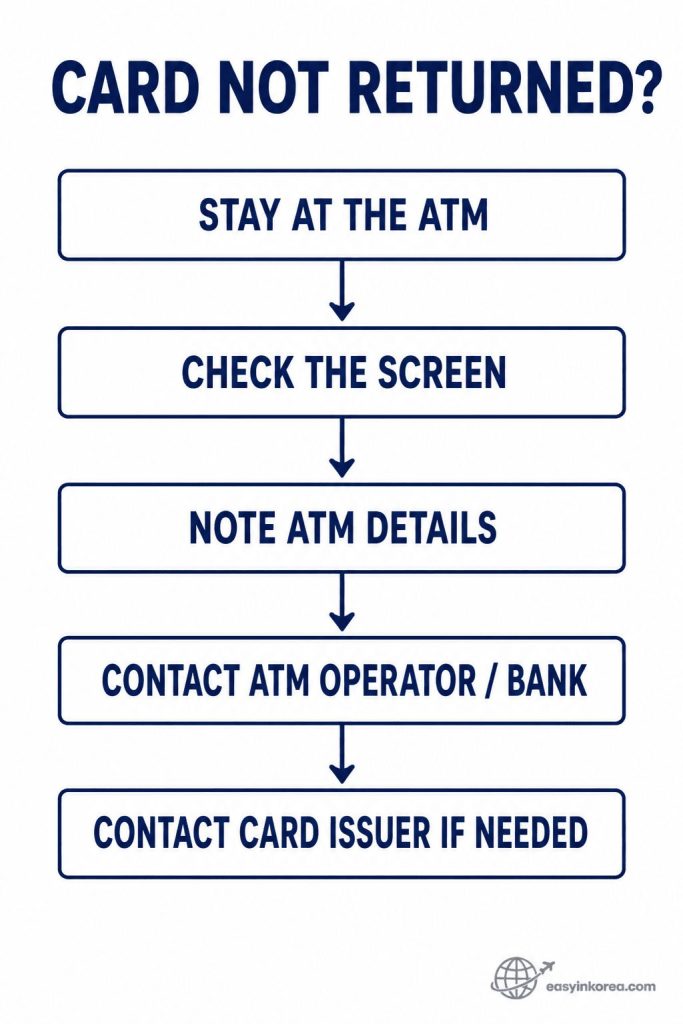
If the ATM keeps your card, do not leave immediately. Check the screen for instructions and note the ATM location, operator or bank name, machine details if visible, and the approximate transaction time.
Use the official contact information shown on or near the ATM to ask the operator or bank what to do next. If the card cannot be recovered or you need account-specific help, contact your card issuer as well.
Card retention is one of the Global ATM and Cash Withdrawal Problems in Korea where the exact recovery process can differ by machine or operator, so follow the instructions for the ATM you actually used.
If the ATM does not return your card, stay near the machine and check the screen for instructions.
Note the ATM location, bank or operator name, machine information if visible, and the approximate time of the transaction.
Look for the official contact information shown on the ATM or nearby. Contact the ATM operator or bank for the next step.
If needed, contact your card issuer as well. Card recovery procedures can differ, so follow the instructions for the specific ATM and card involved.
Charged but No Cash Came Out
Your account shows a withdrawal, but the ATM gave you no cash?
Your account shows an ATM withdrawal, but no cash came out? Before trying again, use the steps below to save the details you may need and check what happened to the transaction.
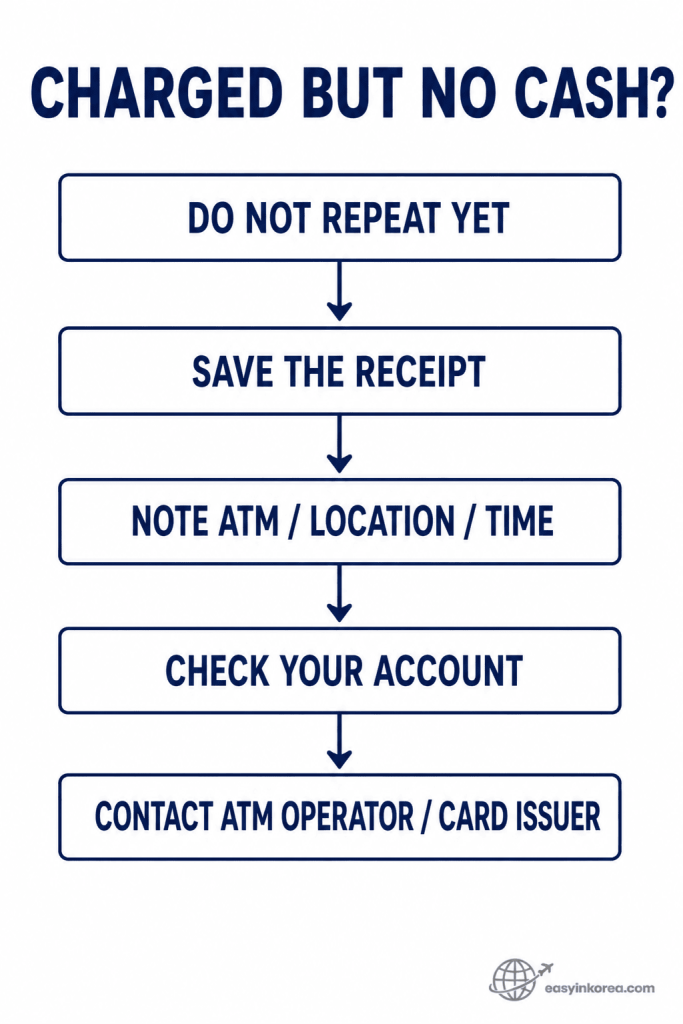
If no cash comes out, avoid repeating the same withdrawal until you check the transaction. Keep the receipt if one was issued, and note the ATM operator, location, approximate time, and any transaction or reference number you can see.
Check your banking or card account to see how the transaction appears. The status shown in your account can help when you contact the ATM operator or your card issuer for the next step.
A charged-but-no-cash transaction is one of the Global ATM and Cash Withdrawal Problems in Korea where keeping accurate details matters. Do not assume that every case will be handled in the same way or resolved within the same amount of time.
This is one of the Global ATM and Cash Withdrawal Problems in Korea where keeping transaction details is especially important.
Do not immediately repeat the same withdrawal just because no cash came out.
Keep the receipt if the ATM issued one.
Note the ATM location and operator.
Record the approximate transaction time.
Check your banking or card account for the transaction status.
Keep any reference number or transaction information shown.
Contact the relevant ATM operator and your card issuer when necessary. Do not assume that every missing-cash transaction will be resolved in the same way or within the same amount of time.
ATM Fees: What Should You Check?
The amount you withdraw is not always the full cost of the transaction.
A foreign-card ATM withdrawal can involve more than one type of cost.
ATM or operator fee — A fee may be shown by the machine before you confirm.
Card issuer fee — Your own bank or card issuer may apply separate overseas withdrawal fees.
Currency conversion cost — The final cost can also depend on how the transaction is converted.
Read the ATM screen before confirming and check your card issuer’s current fee information. Do not rely on a fee remembered from a previous trip.
KRW or Home Currency?
The ATM may ask which currency you want to use.
The ATM is asking you to choose KRW or your home currency? Do not confirm yet. Use the image below to check the rate, fee, and total cost before deciding which option to accept.
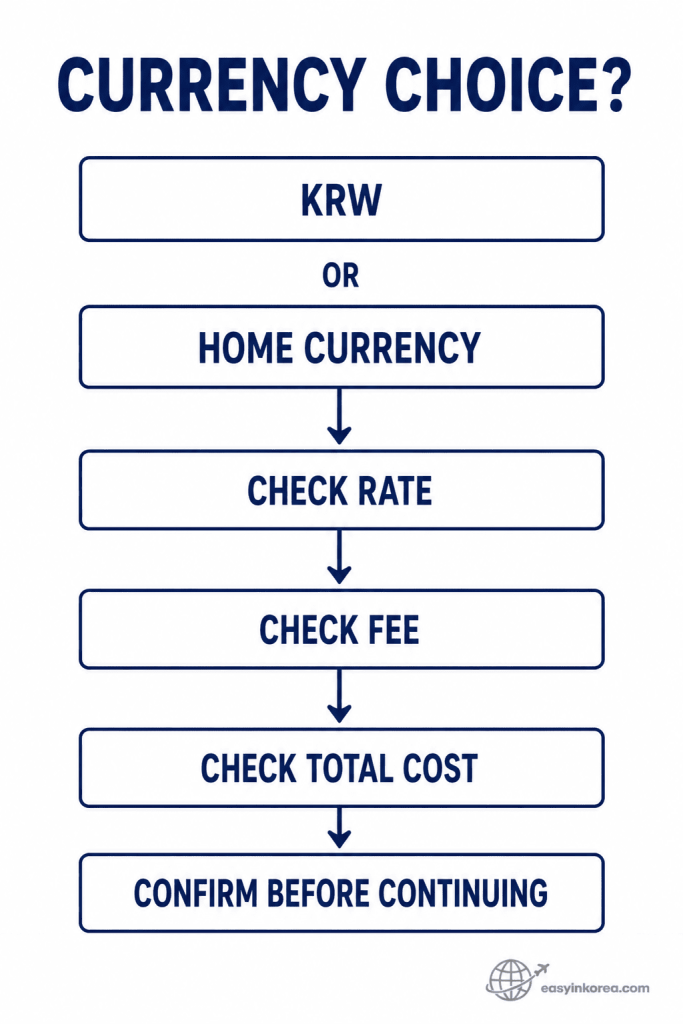
KRW and home currency are two different transaction choices, not steps in a fixed sequence. The useful comparison is the rate, fee, conversion information, and total cost shown before you confirm.
Read the ATM screen carefully and compare the conditions with your own card issuer when possible. Do not assume that one currency option will always cost less in every transaction.
Currency conversion is one part of Global ATM and Cash Withdrawal Problems in Korea where the details shown on the actual ATM screen matter more than a rule remembered from another trip.
Some ATM transactions may present a currency conversion choice. You may see Korean won, your home currency, or information about a conversion rate.
Do not choose automatically just because one option looks more familiar.
Check which currency is being used.
Check the exchange rate shown, if any.
Check additional fees or conversion information.
Compare this with the conditions from your own card issuer when possible.
The useful question is not simply “KRW or home currency?” It is “What rate, fee, and total cost am I agreeing to?”
Airport ATM or City ATM?
Need cash now, or can you wait until you reach the city?
There is no single airport-versus-city answer that works for every traveler.
If You Need Cash at the Airport
Check an ATM that appears to support your foreign card. Review the fee, card support, currency information, and transaction details before confirming.
If You Can Wait Until the City
You can check an ATM near your hotel, station, shopping area, or next destination instead.
Do not assume that every airport ATM or every city ATM has the same fees, supported cards, or operating conditions.
How Much Cash Do You Actually Need?
You may not need to withdraw all of your travel money at once.
Many travelers use a mix of card payments and cash during a trip in Korea.
The amount of cash you need depends on where you are going, what you plan to buy, and which payment methods those places accept.
Carry the payment method you expect to use most.
Keep some cash when your next activity may require it.
Keep a backup payment method in case your main card does not work.
This can reduce the pressure to make a large ATM withdrawal immediately after arrival.
Traveling With Large Luggage or Accessibility Needs
The nearest ATM may not be the simplest one to reach with luggage, a stroller, or a wheelchair.
When you search for an ATM inside an airport, station, mall, or large building, check the full walking route instead of only the distance on the map.
Elevator: Is a step-free route available?
Floor change: Is the ATM on another level?
Walking distance: How far is the complete route?
Luggage: Can you reach and use the ATM while handling your bags?
Final route: Can you continue easily to your next destination afterward?
An ATM that is slightly farther away may fit your route better if it avoids unnecessary stairs, floor changes, or backtracking.
Simple Recovery Plan
Still cannot withdraw cash?
The ATM still does not work with your foreign card? Use the recovery flow below to decide whether to check your card, try another suitable ATM, change the operator, or contact your card issuer.
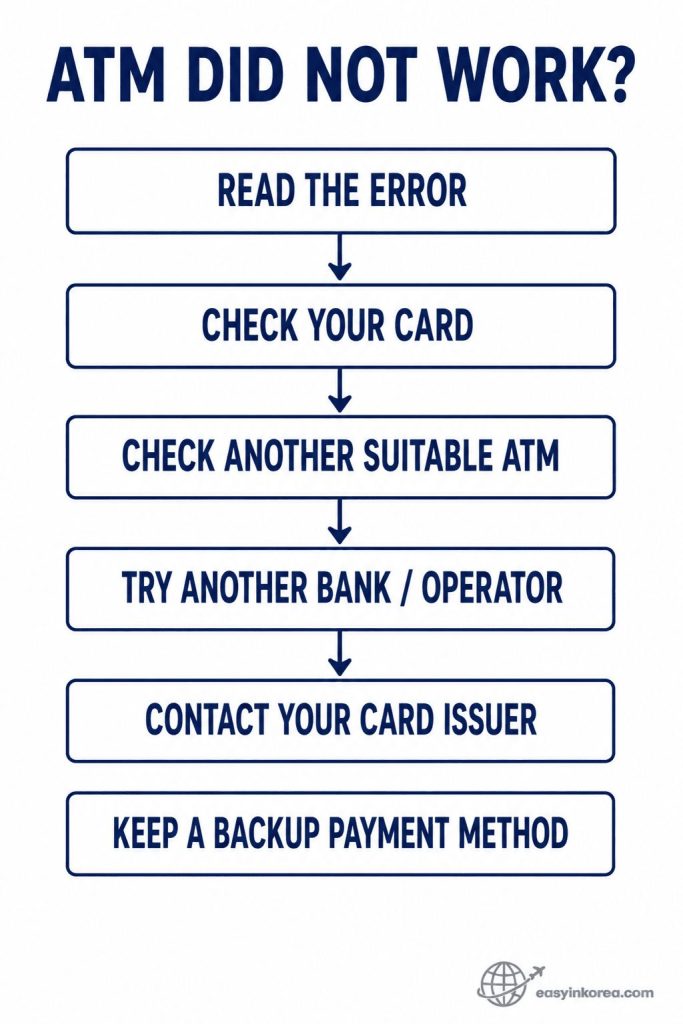
Start with the error message instead of trying random transactions. Check your card status, PIN, available balance, overseas ATM settings, and any restriction that may affect the withdrawal.
If the problem appears to be ATM-specific, check another machine that appears suitable for your card. Trying another bank or operator can also help you separate a machine problem from a card or account problem.
If suitable ATMs continue to reject the card, contact your card issuer for account-specific help. Global ATM and Cash Withdrawal Problems in Korea can have different causes, so the recovery step should match the problem you actually see.
Keep a backup payment method available. This is not another troubleshooting step, but it can help you continue your trip while the ATM problem is being resolved.
When Global ATM and Cash Withdrawal Problems in Korea continue after the first attempt, use a simple recovery order instead of repeating random transactions.
Read the error. Find out whether the ATM shows a card, PIN, limit, network, or machine problem.
Check your card. Review the card status, PIN, available balance, and overseas ATM settings.
Check another suitable ATM. Use a machine that appears to support your card or network.
Try another operator if appropriate. A problem at one machine does not always apply to another ATM.
Contact your card issuer. Do this when suitable ATMs continue to reject the card or when you need account-specific help.
Keep a backup payment method available while you solve the problem.
ATM Safety and Privacy
A few simple habits can help while you use an unfamiliar ATM.
Use the same basic care you would use at an ATM in another unfamiliar place.
Cover the keypad when entering your PIN.
Do not share your PIN with another person.
Check that you have your card before leaving.
Count or secure your cash without blocking the ATM for the next user.
Keep receipts or transaction details when you may need to report a problem.
Avoid displaying personal or account information unnecessarily.
If something on the machine or screen does not look right, stop the transaction and use another suitable ATM.
Official Information
ATM support, fees, limits, card rules, and exchange conditions can change.
Use current information when checking a foreign-card ATM transaction in Korea. A fee, limit, card setting, or supported service can change after an older travel guide was published.
Your Card Issuer
Check overseas ATM access, withdrawal limits, card fees, security blocks, and account-specific restrictions.
ATM Operator or Bank
Check the information shown on the ATM for supported cards, services, transaction conditions, and operator contact details.
Your Card Network
Check current international ATM or network information when you need to confirm where your card may be supported.
You can use the
Visa Global ATM Locator
or the
Mastercard ATM Locator
to check current ATM location information for the relevant network.
The ATM Screen
Review the actual fee, currency choice, withdrawal amount, and transaction message before confirming.
Current official information is more useful than an ATM fee, limit, or screen instruction remembered from a previous trip.
Frequently Asked Questions
These are common questions travelers have when a Korean ATM does not work as expected.
Can I use a foreign card at every ATM in Korea?
No single ATM rule covers every foreign card. Check whether the machine supports foreign or international cards and whether your card network is accepted.
Why was my foreign card declined?
Possible causes include unsupported card or network, an incorrect PIN, a withdrawal limit, a card restriction, a security block, or an ATM problem. Read the error message before deciding what to do next.
Should I try another ATM after a failed withdrawal?
If the problem appears to be specific to that ATM, another suitable ATM may work. If different suitable ATMs continue to reject your card, check with your card issuer.
What should I do if the ATM keeps my card?
Stay near the ATM, check the screen, note the ATM details, and contact the operator or bank using official information shown at the machine. Contact your card issuer if needed.
What if I was charged but received no cash?
Keep the receipt and transaction information, note the ATM location and time, check your account status, and contact the relevant ATM operator or card issuer. Avoid immediately repeating the same withdrawal.
Should I choose KRW or my home currency?
Review the exchange rate, fees, conversion information, and total cost shown before confirming. Do not choose only because one currency looks more familiar.
Do I need cash while traveling in Korea?
Your need for cash depends on where you travel and what you plan to pay for. Keeping more than one payment method can help when a card or ATM does not work as expected.
Are airport ATMs different from city ATMs?
ATM operators, supported cards, fees, and services can differ by machine. Check the actual ATM rather than assuming all airport or city ATMs have the same conditions.
Conclusion: Check the Problem Before Trying Again
A failed withdrawal is easier to solve when you know what to check next.
Global ATM and Cash Withdrawal Problems in Korea do not all have the same cause, so avoid treating every failed transaction the same way.
Find an ATM that appears to support your card.
Check your card and PIN.
Read the ATM screen before confirming.
Check the fee and currency information.
If something goes wrong, identify the problem before trying again.
The important part is not only finding an ATM. It is knowing what to check when the transaction does not go as expected, so you can choose the next practical step.
Related Guides
Continue with the guide that matches your next payment or travel problem in Korea.